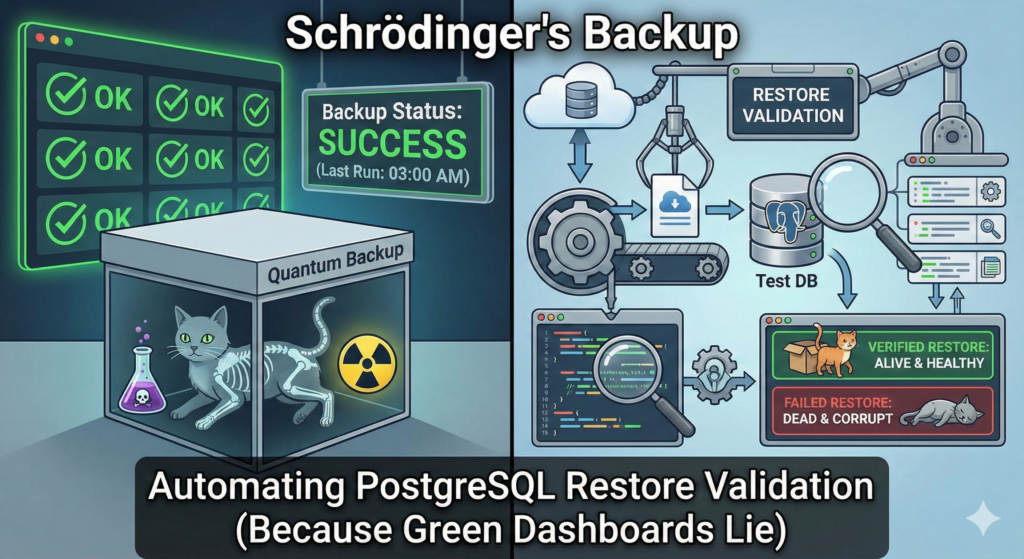
Let’s be honest: a backup is not a backup until you have successfully restored it. Until that moment, what you really have is a collection of encrypted files on expensive storage that might be full of zeros, silent corruption, or missing WAL segments. The “Success” badge on your backup dashboard means nothing if, during a Sev‑1 incident, PostgreSQL refuses to start because of a checksum failure or a missing timeline history file.
In many teams, people rely on exit codes from pg_basebackup or pgBackRest to feel safe. However, this approach is dangerous and unreliable. Instead, this guide shows how to move beyond “taking backups” into continuously validating recoverability. You will build an automated pipeline that pulls your latest production backup, restores it into an ephemeral environment, boots PostgreSQL, runs health checks, and alerts you when anything looks wrong.
1. Backup Success vs. Recovery Success
There is a massive gap between “The backup job finished” and “We can survive a disaster.”
- Backup success: The backup tool ran and wrote files to S3 or disk without crashing.
- Recovery success: PostgreSQL can start up from those files, replay WAL to consistency, and serve application queries.
Because of this difference, your RPO (Recovery Point Objective) is not defined by how frequently you back up. Instead, it is defined by how reliably and quickly you can restore. For example, if you take backups every hour but it takes days to fix a broken chain, your effective RPO becomes random.
Golden rule: Treat your restore validation as a CI/CD pipeline for your infrastructure. If the “build” (restore) fails, the alerting should be as loud as a production outage.
2. Core Principles of Validation
Not all validations are created equal. In practice, they fall into three tiers.
Shallow: The “Is It There?” Check
First, there is the shallow level of validation:
- Checks file existence and maybe checksums (for example,
pgbackrest verify). - It is better than nothing, yet it will not catch logical issues or WAL chain breaks.
Medium: The “Does It Boot?” Check
The next level focuses on whether PostgreSQL can actually start:
- Restores the data, configures recovery, and starts the PostgreSQL service.
- This is the minimum viable verification. When PostgreSQL reaches a consistent state and accepts connections, the backup is very likely good.
Deep: The “Is the Data Right?” Check
Finally, deep validation proves that the data makes sense:
- Runs application‑specific queries, such as
SELECT count(*) FROM key_table, and checks on recent transaction timestamps. - This gold standard proves the data is not just structurally valid but also logically usable.
This guide focuses on pgBackRest because it is a strong standard in modern PostgreSQL architectures. Nevertheless, the same ideas apply to WAL‑G, Barman, or pg_basebackup.
3. Architecture: The Automated Validation Loop
Validation should not happen on production hardware. Instead, you should use an Ephemeral Validation Environment.
Choosing the Validation Environment
You can implement the environment in several ways:
- As a Kubernetes Job
- On a spare VM
- Inside a Docker container
The important part is that it is isolated, repeatable, and disposable.
High‑Level Workflow
The data flow looks like this:
Production DB → S3 / Backup Repo → Validation Job
Validation Job Steps
The validation job follows a simple loop:
- Fetch metadata: Query the backup catalog for the latest successful full or differential backup.
- Provision: Create a temporary directory such as
/var/lib/pgsql/validation/RUN_ID. - Restore: Pull data into the temporary directory.
- Recover: Start PostgreSQL on a non‑standard port (for example, 5440) to avoid conflicts.
- Validate: Run SQL smoke tests.
- Teardown: Stop PostgreSQL and wipe the directory.
- Alert: Push metrics and status to Slack, PagerDuty, or any other alerting system.
Once this loop is automated and scheduled, you effectively gain a daily “DR fire drill” with minimal human effort.
4. Production‑Grade Scripts
Below are production‑ready building blocks you can drop into your environment. Each script has a clear responsibility.
4.1 Bash Master Orchestrator (validate_backup.sh)
This script uses pgBackRest to restore to a temporary location, boots PostgreSQL, and runs the SQL smoke tests.
bash#!/bin/bash
set -euo pipefail

# --- Configuration ---
STANZA="main"
RESTORE_ROOT="/var/lib/pgsql/validation"
RUN_ID=$(date +%Y%m%d_%H%M%S)
DATA_DIR="${RESTORE_ROOT}/${RUN_ID}"
PG_PORT=5440
LOG_FILE="/var/log/pg_validation_${RUN_ID}.log"
PG_USER="postgres"
PG_DB="postgres"
SQL_FILE="./validate_health.sql"

# --- Cleanup Trap ---
cleanup() {
    echo "Cleaning up..." | tee -a "$LOG_FILE"
    if pg_ctl status -D "$DATA_DIR" >/dev/null 2>&1; then
        pg_ctl stop -D "$DATA_DIR" -m immediate || true
    fi
    rm -rf "$DATA_DIR"
}
trap cleanup EXIT

mkdir -p "$(dirname "$LOG_FILE")"

echo "Starting Backup Validation Run: $RUN_ID" | tee -a "$LOG_FILE"

# 1. Get Latest Backup Label
LATEST_LABEL=$(
  pgbackrest info --stanza="$STANZA" --output=json \
  | jq -r '.[0].backup | sort_by(.timestamp.stop) | last | .label'
)

if [[ -z "$LATEST_LABEL" || "$LATEST_LABEL" == "null" ]]; then
    echo "CRITICAL: Could not find any backups for stanza $STANZA" | tee -a "$LOG_FILE"
    exit 1
fi

echo "Testing Backup Label: $LATEST_LABEL" | tee -a "$LOG_FILE"

# 2. Perform Restore to Temp Dir
mkdir -p "$DATA_DIR"
chmod 700 "$DATA_DIR"

echo "Restoring..." | tee -a "$LOG_FILE"
pgbackrest restore \
  --stanza="$STANZA" \
  --set="$LATEST_LABEL" \
  --pg1-path="$DATA_DIR" \
  --type=immediate \
  --delta \
  --log-level-console=info >>"$LOG_FILE" 2>&1

# 3. Configure Ephemeral Postgres
echo "Configuring Ephemeral Instance..." | tee -a "$LOG_FILE"
cat <<EOF >> "$DATA_DIR/postgresql.conf"
port = $PG_PORT
listen_addresses = '127.0.0.1'
unix_socket_directories = '$DATA_DIR'
archive_mode = off
max_wal_senders = 0
hot_standby = on
EOF

rm -f "$DATA_DIR/postmaster.pid"

# 4. Start Postgres
echo "Booting Postgres..." | tee -a "$LOG_FILE"
pg_ctl start -D "$DATA_DIR" -l "$DATA_DIR/startup.log" -w -t 60 >>"$LOG_FILE" 2>&1 || {
    echo "CRITICAL: Postgres failed to start within 60 seconds." | tee -a "$LOG_FILE"
    cat "$DATA_DIR/startup.log" >>"$LOG_FILE" 2>/dev/null || true
    exit 3
}

# 5. Run SQL Validation
echo "Running SQL Health Checks..." | tee -a "$LOG_FILE"
PGPASSWORD="${PGPASSWORD:-}" psql \
  -h 127.0.0.1 \
  -p "$PG_PORT" \
  -U "$PG_USER" \
  -d "$PG_DB" \
  -v ON_ERROR_STOP=1 \
  -f "$SQL_FILE" >>"$LOG_FILE" 2>&1 || {
    echo "CRITICAL: SQL smoke tests failed." | tee -a "$LOG_FILE"
    exit 4
}

echo "SUCCESS: Backup $LATEST_LABEL verified successfully." | tee -a "$LOG_FILE"
exit 0
4.2 SQL Smoke Test (validate_health.sql)
This script runs against the restored instance and validates liveness, schema, and data freshness. You should adjust the table and column names to your application.
sql\set ON_ERROR_STOP on

-- 1. Basic Availability Check
SELECT 'PostgreSQL is alive' AS status;

-- 2. Recovery Check
SELECT pg_is_in_recovery() AS in_recovery;

-- 3. Schema Sanity Check: Critical tables exist
DO $$
BEGIN
    IF NOT EXISTS (
        SELECT 1
        FROM information_schema.tables
        WHERE table_schema = 'public'
          AND table_name = 'users'     -- Replace with a REAL critical table
    ) THEN
        RAISE EXCEPTION 'Critical table "users" is missing from backup!';
    END IF;
END
$$;

-- 4. Data Freshness Check
-- Adjust table and column names to your schema.
SELECT CASE
    WHEN max(created_at) < NOW() - INTERVAL '26 hours'
    THEN 'WARNING: Data is stale'
    ELSE 'Data is fresh'
END AS freshness_check
FROM users;  -- Replace with a table that has a recent timestamp column
4.3 Python Alert Wrapper (notify.py)
The Python wrapper runs the Bash orchestrator and handles notifications to Slack and PagerDuty.
pythonimport subprocess
import requests
import json
import os
import sys
import time

SLACK_WEBHOOK = os.getenv("SLACK_WEBHOOK_URL")
PAGERDUTY_ROUTING_KEY = os.getenv("PD_ROUTING_KEY")
ENV_NAME = os.getenv("ENV_NAME", "Production")

def send_slack(success, log_output, duration_seconds):
    status = "SUCCESS" if success else "FAILED"
    color = "#36a64f" if success else "#ff0000"

    log_lines = log_output.splitlines()
    log_tail = "\n".join(log_lines[-10:]) if log_lines else ""

    blocks = [
        {
            "type": "section",
            "text": {
                "type": "mrkdwn",
                "text": f"*PostgreSQL Backup Validation {status}* for *{ENV_NAME}*"
            }
        },
        {
            "type": "context",
            "elements": [
                {
                    "type": "mrkdwn",
                    "text": f"Duration: `{duration_seconds:.1f}s`"
                }
            ]
        }
    ]

    if not success and log_tail:
        blocks.append(
            {
                "type": "section",
                "text": {
                    "type": "mrkdwn",
                    "text": f"*Error log snippet:*\n``````"
                }
            }
        )

    payload = {
        "attachments": [
            {
                "color": color,
                "blocks": blocks
            }
        ]
    }

    if SLACK_WEBHOOK:
        try:
            requests.post(SLACK_WEBHOOK, json=payload, timeout=5)
        except Exception:
            pass

def trigger_pagerduty(log_output):
    if not PAGERDUTY_ROUTING_KEY:
        return

    url = "https://events.pagerduty.com/v2/enqueue"
    log_lines = log_output.splitlines()
    log_tail = "\n".join(log_lines[-20:]) if log_lines else ""

    payload = {
        "routing_key": PAGERDUTY_ROUTING_KEY,
        "event_action": "trigger",
        "dedup_key": f"backup-validation-{ENV_NAME}",
        "payload": {
            "summary": f"CRITICAL: Backup validation failed for {ENV_NAME}",
            "severity": "critical",
            "source": "backup-validator",
            "custom_details": {
                "logs": log_tail
            }
        }
    }

    try:
        requests.post(url, json=payload, timeout=5)
    except Exception:
        pass

def main():
    start_time = time.time()

    result = subprocess.run(
        ["./validate_backup.sh"],
        capture_output=True,
        text=True
    )

    duration = time.time() - start_time
    success = (result.returncode == 0)
    combined_log = (result.stdout or "") + (result.stderr or "")

    send_slack(success, combined_log, duration)

    if not success:
        trigger_pagerduty(combined_log)
        sys.exit(1)

if __name__ == "__main__":
    main()
5. Scheduling and Automation
Once the scripts work, you need a reliable scheduler with logs and history.
5.1 Cron on a VM
On a traditional server, you can add a cron entry:
text0 8 * * * cd /opt/pg-validator && /usr/bin/python3 notify.py >> /var/log/pg_validator_cron.log 2>&1
This runs the validation daily at 08:00.
5.2 Kubernetes CronJob
In Kubernetes, a CronJob is a clean way to schedule the validation.
textapiVersion: batch/v1
kind: CronJob
metadata:
  name: pg-backup-validator
spec:
  schedule: "0 8 * * *"  # Run daily at 8 AM
  jobTemplate:
    spec:
      template:
        spec:
          containers:
          - name: validator
            image: my-registry/pg-ops-tools:latest
            env:
            - name: SLACK_WEBHOOK_URL
              valueFrom:
                secretKeyRef:
                  name: ops-secrets
                  key: slack-url
            - name: PD_ROUTING_KEY
              valueFrom:
                secretKeyRef:
                  name: ops-secrets
                  key: pd-key
            - name: ENV_NAME
              value: "Production"
            command: ["python3", "/scripts/notify.py"]
            volumeMounts:
            - name: backup-storage
              mountPath: /var/lib/pgbackrest
          restartPolicy: OnFailure
          volumes:
          - name: backup-storage
            persistentVolumeClaim:
              claimName: pgbackrest-repo-pvc
Make sure the image contains PostgreSQL, pgBackRest, psql, jq, Python 3, and the requests library.
6. Alerting Strategy: Signal vs. Noise
You do not want to wake up at 3 AM for a transient network glitch. At the same time, you must wake up if you have not had a valid backup in 24 hours.
Tiered Approach
Use a two‑level alerting model:
- Job failure (warning):
- Trigger: validation script exits non‑zero once.
- Action: send a message to a Slack channel such as
#ops-warnings. - Reason: this may be a transient Docker, network, or S3 issue.
- SLA breach (critical):
- Trigger: no successful validation logged in the last 25 hours.
- Action: page the on‑call engineer.
- Implementation: a “dead man’s switch” such as Healthchecks.io or a Prometheus “absent” alert.
Here is an example Prometheus rule:
text- alert: PostgresBackupValidationMissing
  expr: time() - metric_backup_validation_last_success_timestamp > 90000
  for: 5m
  labels:
    severity: critical
  annotations:
    summary: "No valid PostgreSQL backup verified in > 25 hours"
7. Nuances and Gotchas
Even with automation, reality is messy. You should be aware of several common pitfalls.
WAL Gap Trap
A restore may “succeed” in copying files, but PostgreSQL will not reach consistency if required WAL segments are missing or corrupted. Therefore, the “Does it boot?” level of validation is non‑negotiable.
Version Mismatch
Always validate using the same major PostgreSQL version as production. Otherwise, restoring a PG14 data directory with PG15 binaries will fail immediately.
Collation Nightmares
If production uses en_US.UTF-8 on Ubuntu and your validation container uses Alpine with musl, collation and index behavior can differ. To avoid this, mirror the production OS, or at least the libc and locale configuration, in your validator image.
Cost Management
A full daily restore of a 10 TB database is expensive. To reduce cost:
- Use delta restores with pgBackRest.
- Keep a persistent validation volume so only changed blocks are fetched.
With this approach, you shrink transfer from terabytes to a few gigabytes.
8. Wrap‑Up: Move from Hope to Proof
Implementing this pipeline changes your Disaster Recovery stance. Instead of hoping backups work, you have a daily log that proves they do.
Implementation Checklist
To get started, follow this checklist:
- Create a read‑only user or key for your backup storage (for example, S3).
- Build an image or VM with pgBackRest, jq, Python, and PostgreSQL binaries.
- Deploy the Bash script as a manual job and debug connectivity.
- Add and refine the SQL smoke tests to match your schema.
- Schedule the validation via Cron or a Kubernetes CronJob.
- Intentionally break it (for example, corrupt a file in the restore dir) to confirm PagerDuty or an equivalent system fires correctly.
Ultimately, you do not need to start perfectly. Even validating a small slice of your data each day is far better than never validating at all.